Playground and shared rooms
Share a project by link, join one, permissions for editing and running code.
The Playground tab
Playground is where you work on one project with another person or an AI client. Editing and running code are separate permissions. It has Share a project, Join with a link, the AI client over MCP card, and your active rooms with who is in them and when they end. Inside a project, ⋯ › Share with an AI client or person leads to the same places.
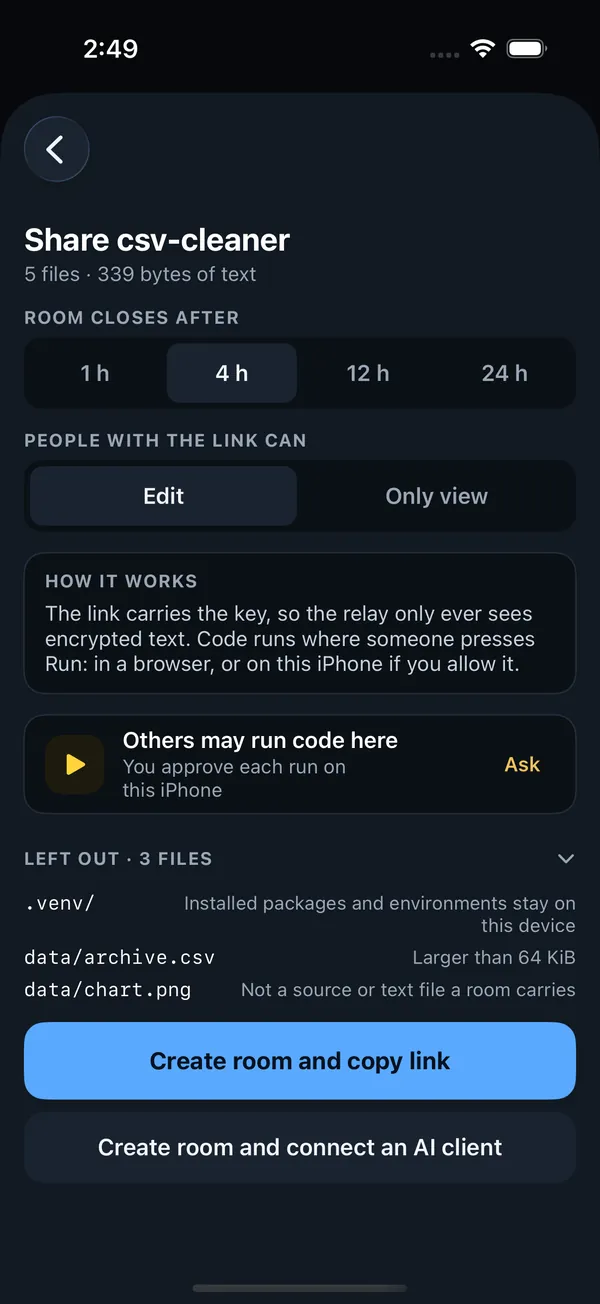
Share a project
Choose a project (it needs at least one .py file), then:
- Room closes after: 1 h, 4 h (the default), 12 h or 24 h.
- People with the link can: Edit or Only view.
- Others may run code here: see below.
Create room and copy link encrypts the files, creates the room and copies its link. Create room and connect an AI client does the same and shows how to hand the room to an AI client. Send the link only to the people you mean: whoever has it can join with the access it grants.
What a room carries
A room carries source and text files: Python, text, Markdown, CSV, JSON, TOML, YAML, HTML, CSS, JavaScript, SQL and similar, plus requirements.txt, README, LICENSE and .gitignore. Up to 16 files, 64 KiB each, 128 KiB in all. The share sheet lists anything Left out and why:
| Reason | For example |
|---|---|
| Installed packages and environments stay on this device | .venv, site-packages, node_modules |
| Not a source or text file a room carries | Images, databases, archives |
| Larger than 64 KiB, or not UTF-8 text | Big data files, binary files |
| Over the 16-file limit, or over the 128 KiB limit for all files | The rest of a large project |
.git, .pythilo and caches are never included.
Share as a link
For a quick, one-off share there is no need for a room. ⋯ › Share as a link packs the project's text files into a single link, compressed into the part after #, so no server keeps a copy. Opened in a browser, it shows the code in the playground on pythilo.com, ready to run; opened on a device with Pythilo, or pasted into Join with a link, it becomes a new project. .env files, .git and .pythilo are left out, and a project too large for a link says so: share a live room instead.
Join with a link
Paste a room link (or a shared project link) into Join with a link and tap Join room, or open the link on the device and choose Pythilo. Joining makes a new project on this device with the room's files. Nothing runs until you press Run, or allow someone else to. Links look like https://pythilo.com/playground/room/…/#key=…; everything after # is needed, and it never leaves your device in a request. A room that has ended cannot be joined.
In a room
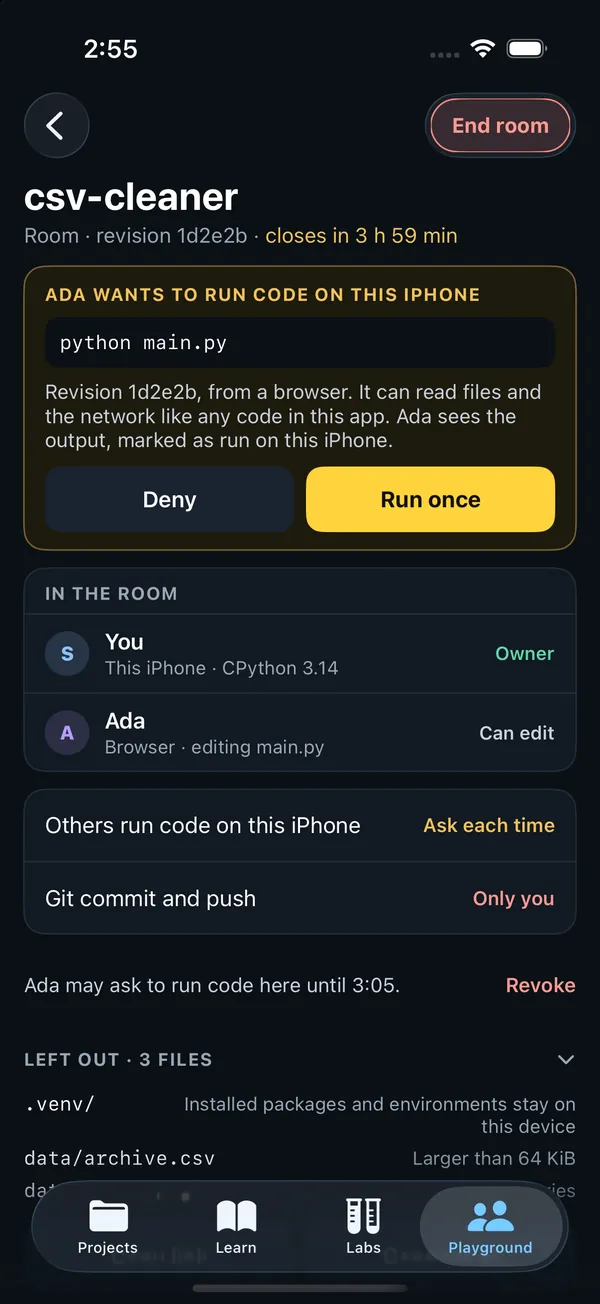
Edits go both ways as you type, and you see the others' cursors with their names. The room screen shows its revision and when it closes, In the room with each person's access (Owner, Can edit, Can view) and the file they are editing, the permissions, Recent runs on this iPhone, and Copy link, Connect AI and Open in the editor. Your name in rooms is set in Settings. Git commit and push is always yours alone.
Running code for others
Code runs only where someone asks it to: in their own browser, or on a device whose owner allows it. Each result says where it ran, on which Python, and for which revision. For your device you choose:
| Setting | Meaning |
|---|---|
| Ask each time | The default. A request shows who wants to run what, with Deny and Run once. |
| Allowed in this room | Runs start without asking while the room is open. |
| Not allowed | Code runs only where people press Run. |
Only people who can edit may ask. You can Revoke a permission you gave, and permissions end when Pythilo goes to the background. A run for someone else can be stopped like your own.
Ending a room
The owner can End room for everyone; others can Leave room. Rooms also end on their own when their time is up. Your copy of the files stays on your device either way.