Projects and files
Make, clone and import projects, templates, the file drawer and where files live.
The Projects screen
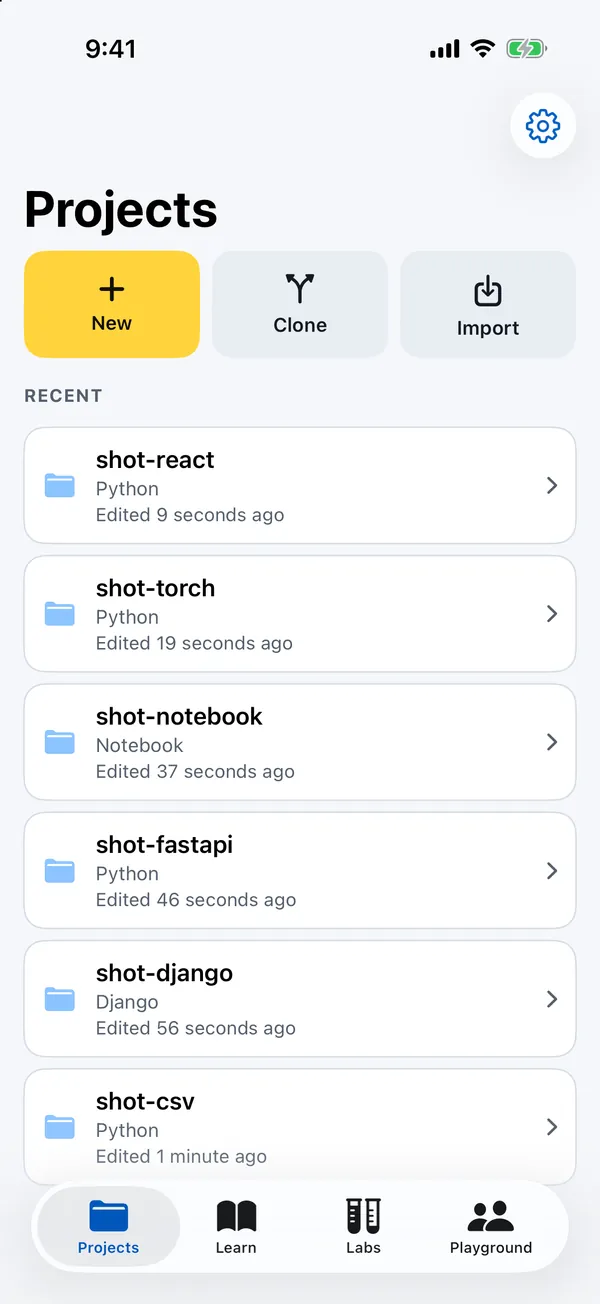
Pythilo opens on Projects. At the top are three tiles: New, Clone and Import. Below them, Recent lists your projects, newest first, each with its kind (Python, Django, Web or Notebook) and when it was last edited. Before you have any, a card explains that a project is an ordinary folder that also shows up in the Files app.
Touch and hold a project for Rename, Share folder and Delete. Delete removes the folder from the device, so commit and push first if you may want it back.
Templates
New asks for a name (it suggests my-project) and what to start from. If the name is taken, Pythilo adds -2, -3 and so on. Every template includes a .gitignore that leaves out .pythilo/, __pycache__/ and *.sqlite3.
| Template | What you get |
|---|---|
| Empty | One main.py, ready to run. |
| CSV cleaner | A module, a script, tests and a CSV file: main.py, cleaner.py, test_cleaner.py, people.csv. |
| Django notes | A Django site with a notes app, a model, a migration, a template and SQLite. |
| Flask app | A small JSON API in hello.py. Run it with flask --app hello run. |
| FastAPI | Validated models, async routes, a WebSocket and tests. |
| React and FastAPI | A React front end built with npm and esbuild, served by a FastAPI API on the same device. |
| ASGI API | Starlette on Uvicorn. Run it with uvicorn main:app. |
| Notebook | A study.ipynb with cells and NumPy. |
| PyTorch | A small network that trains on the device's CPU. |
| Neural Engine | Core ML models from Python with pythilo.coreml. |
Clone a repository
Clone takes an HTTPS address, such as https://github.com/you/repo.git. For a private repository, fill in Username and Access token under Private repository; leave them empty for a public one. The token is stored in the iOS Keychain, on this device only, and is never written into the project. SSH addresses are not supported: use the HTTPS address. See Git for everything after the clone.
Import a folder
Import opens the system file picker. Choose a folder (from Files, iCloud Drive or another provider) and Pythilo copies it into your projects. Import takes folders, not zip archives.
Where projects live
Each project is a folder in Pythilo's Documents, under Projects. Because the app shares its Documents folder, you can see and edit projects in the Files app and from a Mac with Finder. Standard iCloud or computer backups of the device include them.
Inside a project, Pythilo keeps its own things in a hidden .pythilo folder; installed packages go to .pythilo/site-packages, so each project has its own. The file tree hides .git, .pythilo, __pycache__ and .DS_Store.
The file drawer
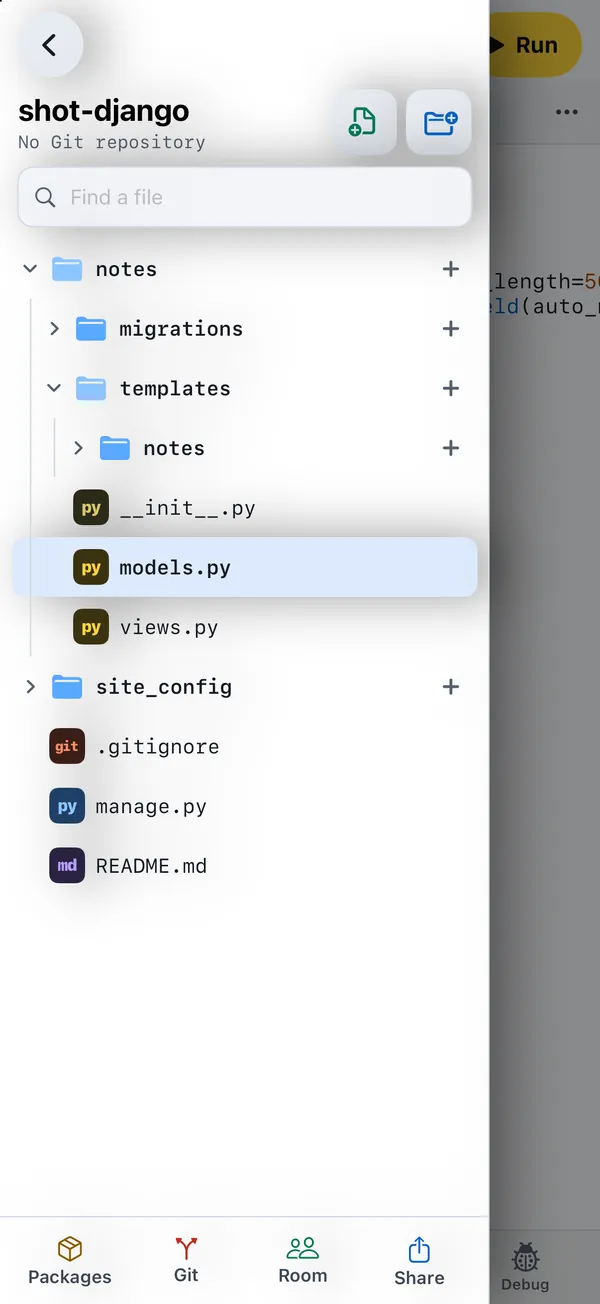
On an iPhone, the project's files live in a drawer. Open it with the folder button at the top, by swiping in from the edge of the screen, or with ⌘B on a keyboard. Close it by swiping back or tapping outside it. You can choose which edge it lives on, and turn the swipe off, in Settings. On an iPad, and on wider screens, the files sit in a column beside the editor instead.
The drawer shows the project's name and either the current Git branch with the number of changes, or No Git repository. It has buttons for New file and New folder, a Find a file search, and at the bottom Packages, Git, Room, Site (while a server runs) and Share.
Files changed since the last commit carry a Git badge: A added, M modified, D deleted, ? untracked and ! in conflict. A folder shows the badge of what is inside it.
File and folder actions
Touch and hold a file or folder for:
- New file or folder here (on a folder) or New file beside it (on a file)
- Rename and Duplicate
- Move to folder…: type the new path inside the project. Missing folders are created.
- Copy path and Share
- Delete, which removes it from the device. Commit first if you may want it back.
Each folder also has a + button for a new item inside it. Files that are not text, such as images, do not open in the editor; Pythilo offers Share file instead.
New file or folder
The New in … sheet switches between File and Folder. The path may contain slashes, so app/models/user.py makes the folders and the file in one go; a preview marks each part as existing, a new folder or a new file. For files, Start from offers:
| Start from | Makes |
|---|---|
| Empty | An empty file with the name you typed. |
| Module | A .py file. |
| Package | A folder with __init__.py inside. |
| Test | A .py test file for pytest. |
| Notebook | An .ipynb notebook. |
A row of keys above the keyboard types /, .py, _, - and . for you.